BDWIN24 App Download
Get the official BDWIN24 Android app the safe way. Because it is no longer on the Google Play Store, you install a verified APK — here is exactly how, step by step.
In short: The BDWIN24 Android app is a free ~41.6 MB download that needs Android 5.1 or newer. It was removed from Google Play in 2025, so the official route now is a direct APK. Enable installs from your browser, verify you are on the real BDWIN24 link, install, and log in.
BDWIN24 app — at a glance
| Detail | Value |
|---|---|
| Platform | Android (APK) · web app for iOS |
| File size | ~41.6 MB (version 2.0) |
| Requires | Android 5.1 and above |
| Price | Free to install |
| Payments | bKash, Nagad, Rocket |
| Google Play | Removed (2025) — install the official APK |
Why BDWIN24 isn’t on the Google Play Store
If you searched Google Play and could not find BDWIN24, you are not doing anything wrong. Google Play policy restricts real-money gambling apps in many regions, and app-listing trackers show the BDWIN Android app was removed from Google Play on 30 May 2025. That is normal for betting apps in South Asia — the operator distributes the app itself instead.
It also means you should ignore any Play Store result that claims to be BDWIN — some are unrelated apps reusing the name. The safe, current source is the official APK linked from BDWIN24’s own site.
How to install the BDWIN24 APK safely
Follow these steps in order — they take about two minutes:
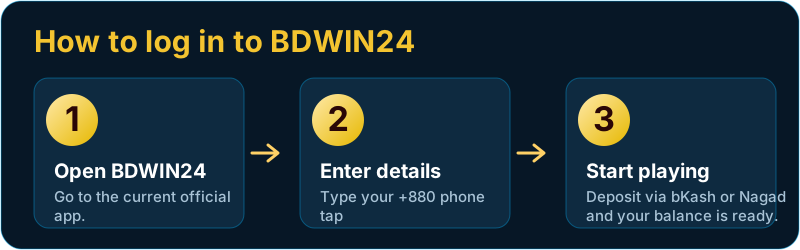
- Open the official BDWIN24 link. Use the official site and tap the Android / download button. Confirm the address bar shows the real BDWIN24 domain.
- Allow the download. Your browser may warn that this file type can harm your device — that is the standard Android message for any APK, tap Download anyway.
- Enable “install unknown apps.” When you open the file, Android asks for permission for your browser to install apps. Toggle it on in Settings → Apps → Special access. You can turn it off again afterwards.
- Install. Tap the downloaded
.apk, then Install, and wait a few seconds. - Open and log in. Launch BDWIN24, then log in with your phone number or register a new account.
Verify the app is genuine
- The download should come straight from the BDWIN24 site, not a third-party mirror.
- The file size should be near 41.6 MB — a wildly different size is a red flag.
- Android’s own Play Protect scans new installs; let it run.
- After installing, keep “install unknown apps” switched off for everyday safety.
iPhone / iOS and the web app
There is no APK for iPhone because iOS does not allow them. iPhone users have two options: use the mobile web version of BDWIN24 in Safari (everything runs in the browser — login, deposits, games), or add it to the Home Screen from Safari’s Share menu so it opens like an app. The web version also works on any Android phone if you prefer not to install the APK.
How to update the app
Because it is not on Google Play, the app does not auto-update. When a new version is out, BDWIN24 usually prompts you inside the app or you simply download the newest APK from the official site and install it over the old one — your account and balance are stored on the server, not the app, so nothing is lost.
Permissions the app asks for
When you first open the BDWIN24 app, Android may request a few permissions. None of them are unusual for a betting app, but it’s worth knowing what each is for so you can decide:
- Storage — to save the app’s data and any images or receipts you download.
- Notifications — for deposit confirmations, promo alerts and results. You can turn these off in Settings later.
- Network access — required, since the games and your wallet run online.
The app does not need your contacts, call logs or SMS to function — if any download demands those, treat it as a red flag and remove it.
Install won’t work? Quick fixes
If the APK won’t install, one of these is almost always the cause:
| Symptom | Fix |
|---|---|
| “App not installed” | An older or fake copy is already on the phone — uninstall it first, then install the fresh APK. |
| “Install blocked” | Enable “install unknown apps” for your browser in Settings → Apps → Special access. |
| Download keeps failing | Check your connection and free storage; re-download from the official link. |
| Play Protect warning | Standard for any off-Play APK; if you trust the official source you can continue, then let Play Protect scan it. |
Claim your bonus after installing
New accounts qualify for the BDWIN24 welcome bonus on the first deposit. Install the app, register, deposit through bKash or Nagad, and the bonus is credited so you have more to play with. See the bonus guide for the exact terms and the honest review for how withdrawals work.
BDWIN24 app download — FAQ
Is the BDWIN24 APK safe to download?
It is safe when you get it from the official BDWIN24 link and Android Play Protect scans it on install. The risk comes from unofficial mirrors, so avoid random file-locker or forum downloads.
Why is BDWIN24 not on the Google Play Store?
Google Play restricts real-money gambling apps in many regions and the BDWIN Android app was removed on 30 May 2025. The operator now distributes the app as a direct APK from its own website.
How big is the BDWIN24 app and what Android does it need?
The app is about 41.6 MB (version 2.0) and requires Android 5.1 or newer.
Is there a BDWIN24 app for iPhone?
There is no iOS APK. iPhone users open the BDWIN24 mobile website in Safari and can add it to the Home Screen to use it like an app.
How do I update the BDWIN24 app?
Download the latest APK from the official site and install it over the current version. Your account and balance are stored server-side, so nothing is lost.